Stacking contexts
Browser as a runtime · part 2 of 6. Previous: CSS cascade.
Part 1 decided what color a box gets. This part is about who paints on top. Those are different machines. z-index is not a global high-score.
Try this before you read anything else
Section titled “Try this before you read anything else”Card A has z-index: 9999. Card B has z-index: 1. A is sitting inside a parent wrapper. B is a sibling of that wrapper.
A should win, right? Play it. Then click the button.
You barely changed anything. The parent got opacity: 0.99 — still looks solid. A’s number did not change. B’s number did not change. And yet B is on top.
Sit with that for a second. Why would a parent’s opacity, of all things, demote a child that is 9999?
What a stacking context actually is
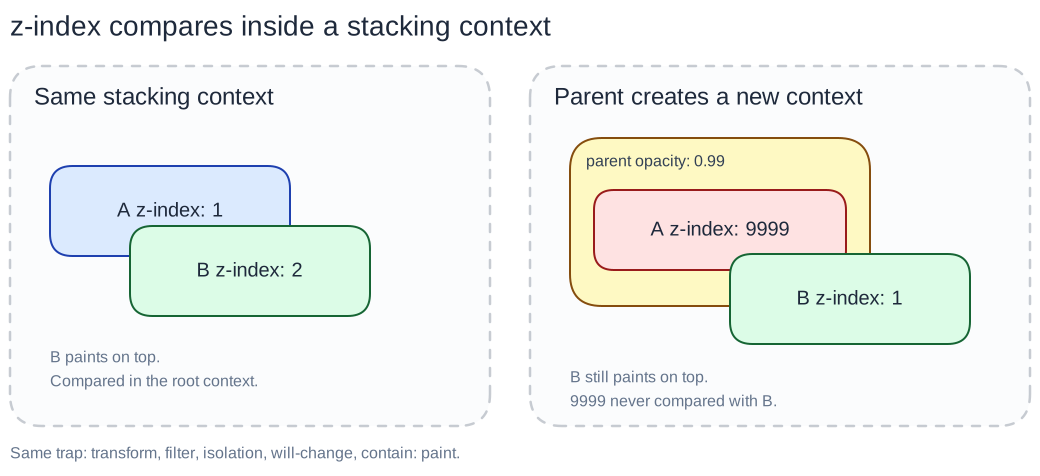
Section titled “What a stacking context actually is”z-index only ranks boxes that share the same stacking context. Think of it as a private leaderboard, not a website-wide ranking.
A stacking context is a sealed box. Numbers inside the box only compete with each other. The box as a whole gets one rank in the parent’s leaderboard. A child cannot climb out, no matter how big the number.
Analogy: a school, not one giant classroom.
- Each classroom has its own seating chart (
z-indexamong classmates). - The school ranks classrooms, not individual students.
- The loudest kid in room 3 does not get a better seat than someone in room 1. Their 9999 never leaves the room.
When a parent becomes a stacking context, it is that classroom door clicking shut.
Back to the demo — why B won
Section titled “Back to the demo — why B won”The parent started as position: absolute with z-index: auto. That combination does not create a stacking context. The classroom door is open. A’s 9999 and B’s 1 sit in the same ranking. 9999 wins. You saw that first.
Then we set opacity: 0.99 on the parent. Any opacity less than 1 creates a stacking context. The door shuts.
Now the paint order is:
- Rank the parent as a whole against B. The parent is still
z-index: auto(treated like0when it is a stacking context). B isz-index: 1. 1 beats auto. - Inside the parent, A’s
9999still wins — but only against siblings inside that parent. There are none that matter. A never gets a meeting with B.
That is why inspecting the losing child is the wrong move. Inspect the parent. If the parent sealed the box, raise its z-index (or stop creating the context). Inflating the child’s number does nothing.
Same surprise, other properties
Section titled “Same surprise, other properties”Opacity is the famous one because 0.99 looks identical to 1. These do the same stacking trick. Several of them can look like “no visual change” too.
Each one below is a real CSS job. Creating a stacking context is a side effect. The second demo lets you apply each trigger to the same parent and watch A lose again.
opacity less than 1
Section titled “opacity less than 1”What it is: how see-through the element is. 1 is solid. 0 is invisible.
Why it traps: the browser composites that subtree as one layer so transparency can blend correctly. That layer is a stacking context.
.parent { opacity: 0.99; } /* looks solid, seals the box */transform (anything but none)
Section titled “transform (anything but none)”What it is: move, rotate, scale, or skew — translate, rotate, scale, matrix, and friends.
Why it traps: even translateX(0) or scale(1) (no visible change) promotes the element to its own layer. Animating a slide-in header is a classic: the header’s ancestor gets transform, and a modal z-index: 9999 suddenly sits under it.
.header-wrap { transform: translateY(0); } /* animation leftover, still seals */filter (anything but none)
Section titled “filter (anything but none)”What it is: visual effects on the element’s pixels — blur(), brightness(), drop-shadow(), grayscale(), and so on.
Why it traps: filters run on a snapshot of the whole subtree, so that subtree becomes one unit. A hover filter on a card can bury the next card’s dropdown.
.card:hover { filter: brightness(1.05); } /* slight glow, new stacking context */isolation: isolate
Section titled “isolation: isolate”What it is: “start a fresh blending group.” Mix-blend-mode and background-blend-mode stay inside this element instead of blending with whatever is behind it on the page.
Why it traps: isolation is literally “make a new stacking context.” There is often no visual change if you are not using blend modes. Easy to miss in a reset or a “fix blending” snippet.
.widget { isolation: isolate; } /* looks the same, door is shut */will-change: opacity or will-change: transform
Section titled “will-change: opacity or will-change: transform”What it is: a hint to the browser: “I might animate this soon — get a layer ready.” Use it sparingly, on elements that actually animate.
Why it traps: if you hint a property that would create a stacking context, the browser may create that context now, before the animation. will-change: opacity on a layout wrapper is a silent trap. will-change: scroll-position does not do this — it is the compositing hints that matter.
.drawer { will-change: transform; } /* optimization hint, also seals the box */contain: paint
Section titled “contain: paint”What it is: a performance hint: “nothing inside me paints outside my box.” The browser can skip drawing descendants that sit off this element’s overflow.
Why it traps: paint containment requires a stacking context (and it clips overflowing descendants). If a tooltip or dropdown must poke out of the parent, contain: paint both clips it and traps z-index.
.list-item { contain: paint; } /* cheaper paint, tooltip cannot escape */How this bug shows up in real UI
Section titled “How this bug shows up in real UI”- A modal sits under a sticky header because the header’s ancestor uses
transformfor a slide animation. - A dropdown is covered by the next card because a list item has
filteroropacityon hover. z-index: 9999on a portal’s child does nothing if the portal node still lives under a transformed layout wrapper.
Fix the parent, not the child’s number. Either give that parent a higher z-index in its context, or remove the property that created the extra context if you do not need it.
Stacking decides who is painted on top. Hit-testing decides who got the click. Those are not always the same node — next in this series.